
The quiet lead-loss problem
Form-to-CRM integration usually fails in the most expensive way: quietly. The form submits, your website shows a thank-you message, and maybe someone on the team gets an email, so it feels “handled.” But behind the scenes, a webhook can time out, a step in an automation can change, or the CRM can reject a field value—and nobody gets told. You don’t find out until you’re missing revenue, wasting staff time, or calling the same person twice.
This matters more in 2026 because local discovery is constant. Over 80% of consumers search for local businesses online at least once a week, which means your website is receiving steady intent traffic even when you’re not “running marketing.” When those visitors fill out a form, they’re raising their hand for a quote, a booking, or a callback, and they expect a fast response. If your pipeline drops even a few of those per month, the loss can easily be hundreds to thousands of dollars depending on your average job size.
There’s also a second-order cost: messy data makes every follow-up worse. If names land in the wrong fields, phone numbers include random formatting, or the “service needed” gets saved as a note instead of a selectable category, your team starts mistrusting the CRM. That leads to workarounds like spreadsheets, inbox searches, and “just call them and ask again,” which slows down response time and makes reporting basically useless. A proper connection isn’t about tech for tech’s sake—it’s about making sure every lead becomes a clean, actionable record exactly once.
A scenario you’ll recognize
Picture a local service business running a normal week: a handful of calls, a handful of form submissions, and a couple of quote requests from after-hours visitors. The owner sees the form email notifications coming in and assumes the CRM is being updated too. Meanwhile, the office manager is working out of the CRM, trusting it as the single source of truth. Everyone believes the system is organized.
Then friction shows up in little ways that don’t look like “a broken integration.” A prospect says they never got a confirmation, so they submit again, and now you have two contacts with slightly different names. Another lead comes in tagged as “Facebook” even though it came from Google, because the tracking fields never made it through. A third lead gets created, but the phone number lands in a custom field no one looks at, so nobody calls them until two days later.
If a lead can disappear silently, it eventually will—usually on your busiest day.
The fix is not just picking a different form plugin or flipping on another connector. The fix is treating the form-to-CRM connection like a small, critical system: clear rules, clean inputs, dedupe protection, and a way to know when it breaks. Once you build it that way, you stop guessing and start trusting what your website is actually producing.
Decide what record gets created
Before we touch field mapping, we decide what the CRM should do with a submission. The most common mistake we see is letting every form create a brand-new contact and a brand-new deal, no matter what. That sounds fine until a past customer uses your “contact” form, a spouse submits from a shared email, or someone requests a second service later in the year. Suddenly your CRM is full of duplicates and half-linked records.
We like to choose one primary “thing” the form produces, then attach everything else to it. For many local service businesses, that primary record is the contact, and the submission creates a new opportunity or job request only when it’s actually a new request. For others, the primary record is the job request, and the contact is created only if it doesn’t exist already. The key is deciding this deliberately so the team’s workflow matches what the automation does.
At this stage, we also pick the “match rule” for existing records. In most CRMs, email is the safest unique identifier, but many local businesses get leads who prefer text and don’t share email. In those cases, phone number becomes the real identifier, but it needs consistent formatting to work. If you decide your CRM will match by phone, then the website form has to standardize phone numbers before sending them.
Once this is decided, everything else gets easier because you’re not guessing what should happen when the same person submits twice. You’re building toward one simple promise: every submission either updates the right existing person or creates a new one, and it never makes a mess. That promise is what keeps your response time fast and your pipeline readable.
Map fields like a contract
Field mapping is where “it connected” setups go to die. The form has fields like Name, Phone, Email, Service Needed, City, and Message, and the CRM has its own structure that doesn’t always match. If you just map the “closest sounding” fields, you can end up with last names in the first-name field, addresses stuffed into notes, and service requests saved in a place your team never checks. That’s not a technical error—it’s a workflow error that becomes a sales problem.
We treat mapping like a contract between the website and the CRM. Each field needs a defined destination, a defined format, and a defined “required or optional” rule. If your CRM routes leads based on service type or location, those fields need to be mapped into routing-friendly fields, not just dumped into a message box. And if your CRM expects a dropdown value like “Water Heater” but your form sends “waterheater,” you’ll get misroutes or failed creates.
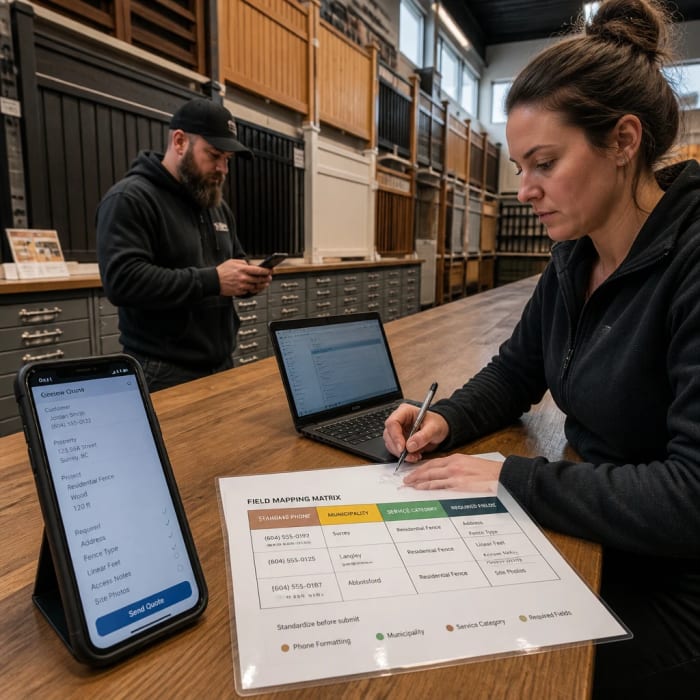
A practical way to do this is to keep a short mapping document that matches each form field to its CRM field and notes any formatting rules. This becomes your reference when you change the form, switch CRMs, or add a second location. It also makes debugging faster because you can see where the data should have landed. If you only do one “grown-up” thing for your integration, make it this.
Finally, map the boring fields too. Timestamp, page URL, and form name don’t feel important until you’re trying to figure out why leads slowed down or why one landing page produces better customers. Those fields are the breadcrumbs that help you troubleshoot and prove what’s working. Without them, every conversation turns into opinions instead of facts.
Validate before you send
Validation means catching bad or incomplete data before it hits your CRM. If your CRM rejects a submission because a required field is missing or formatted wrong, that lead may vanish unless you’re watching logs in real time. That’s why we prefer validation on the website side first, where you can give the visitor a clear prompt like “Please enter a valid phone number.” It’s better for the customer, and it protects your data.
Basic validation is simple: require a phone number or email, make sure an email looks like an email, and keep phone numbers to digits. But the bigger win is consistency. If your team texts leads, you want numbers stored the same way every time so the CRM can match them and automations can use them. If you serve multiple towns, you want the city field standardized so routing rules don’t break on “St. Louis” versus “Saint Louis.”
Spam filtering is part of validation too, but we’re careful here. Over-aggressive spam filters block real people, especially on mobile or when someone is in a hurry. We like lightweight protections: a hidden field real humans won’t fill out, rate limits that stop bots from submitting 50 times, and a clean message to the visitor if something seems off. The goal is fewer junk leads without sacrificing real ones.
When validation is done right, your CRM becomes cleaner without anyone doing more manual cleanup. That saves real time every week, because staff aren’t fixing records, retyping phone numbers, or calling someone back to ask for missing details. More importantly, it helps your follow-up feel professional, which increases close rates even when lead volume stays the same.
Prevent duplicates with idempotency
Duplicates happen for normal reasons, not just user error. A person submits, your website times out, and they hit refresh and submit again. A connector tool retries automatically, and the CRM receives the same payload twice. Or your team member clicks “resend” on a failed task and accidentally creates a second contact. Without protection, your CRM does exactly what you told it to do: create duplicates faithfully.
Idempotency is a fancy word for a simple promise: the same submission should only create one record, even if it’s processed twice. In practice, that means generating a unique confirmation ID for each form submission and storing it in the CRM. If the same confirmation ID shows up again, the automation updates the existing record instead of creating a new one. This one change eliminates a huge class of “why do we have two of everything?” problems.
We also define dedupe keys that match how your business actually works. If email is present, we match on email. If not, we match on normalized phone number. If both are missing, we treat it as incomplete and route it to a fallback inbox instead of contaminating the CRM. That keeps your CRM from becoming a junk drawer while still preserving the lead for manual review.
Duplicates aren’t just annoying; they cost money. Your team wastes time chasing the same person twice, or worse, you send multiple texts and look spammy. And when reporting is based on “number of leads,” duplicates inflate the number and hide the real conversion rate. Idempotency keeps the math honest and the customer experience smooth.
Capture attribution and consent
If you can’t tell where a lead came from, you can’t repeat what works. In 2026, local visibility is still heavily influenced by platforms like Google, with Google Business Profile signals carrying the most weight for local pack visibility, and on-page signals and reviews close behind. That mix means leads may come from your Google listing, a local landing page, a blog answer to a specific question, or a map result—and the CRM should reflect that reality. Otherwise you’ll argue about “what’s working” based on vibes.
Attribution is just the trail of how someone got to your form. We like capturing the landing page URL, the referrer, and any tracking tags in the link like source and medium, plus click IDs such as gclid or fbclid when they exist. Even if you don’t run ads, those fields still help because they separate “found us on Google Maps” from “found us on a service page.” Store them on the lead record and keep them unchanged, even if the person submits a second time later.

Consent is the other half of this. If you’re texting or emailing, you need a clear checkbox and you need to store what the person agreed to, when they agreed, and which form they used. That’s not just legal hygiene; it prevents awkward moments where someone says, “I never asked for texts,” and your team can’t verify what happened. Your CRM becomes a record you can trust, not a liability.
When attribution and consent are captured correctly, routing gets smarter too. You can prioritize leads from high-intent pages, route by service area, and see which pages actually produce booked work. That makes your website more than an online brochure—it becomes a measurable lead engine. And if you’re investing in local SEO, it’s the difference between “we’re ranking” and “we’re getting the right jobs.”
Add logs, retries, and alerts
The biggest gap in most setups is failure handling. People connect a form to a CRM through a plugin or an automation tool, test it once, and move on. But connectors fail over time: passwords expire, fields get renamed, webhook endpoints change, or a platform rate-limits requests during peak traffic. If you don’t have logging and alerts, you find out after you’ve already missed leads.
We build integrations with three safety nets: logs, retries, and a fallback. Logs mean every submission gets recorded with a status and the confirmation ID, so you can trace what happened. Retries mean transient failures are automatically attempted again, because internet hiccups are normal. A fallback means that if the CRM can’t accept the lead, it still lands somewhere a human will see the same day.
A simple, practical setup looks like this:
- Give every submission a confirmation ID and show it on the thank-you page so support can look it up fast.
- Send real-time alerts for failures to a monitored inbox or channel, not a “set it and forget it” email.
- Use a dead-letter fallback inbox where failed payloads are stored for manual processing.
- Retry failed sends on a schedule, and stop after a reasonable number so you don’t spam the CRM.
“Connected” isn’t the goal. “Detectable when broken” is.
This instrumentation is what turns a fragile connection into a system you can rely on. It also reduces stress, because you’re not wondering if leads are slipping through cracks. When something breaks, you’ll know quickly, and you’ll have the info needed to fix it without guesswork.
Test end-to-end before launch
Most people test the happy path once: submit the form, see a record in the CRM, done. That’s not enough, because real-world leads are messy. People submit twice, type weird characters, omit fields, or use autocorrect that changes their name. Your test needs to prove the system behaves correctly under normal human behavior, not just ideal behavior.
We like an end-to-end checklist that you can repeat anytime you change the website, the form, or the CRM. It’s not a huge process, but it’s disciplined. You run a small set of test submissions, you confirm what landed in the CRM, and you confirm what the team sees and does next. This prevents the “we redesigned the site and leads got weird” problem.

Here’s a simple testing set we use:
- Submit a clean lead and confirm every mapped field lands in the right place.
- Submit the same lead again and confirm it updates instead of duplicating.
- Submit with a missing optional field and confirm it still creates correctly.
- Force a failure scenario and confirm the fallback inbox and alerts fire.
After that, we watch the first week of real submissions closely. Not forever—just long enough to catch edge cases you didn’t think of. Once you see consistent behavior, you can relax knowing your website and CRM are actually working together. That confidence is worth more than any fancy widget on the site.
What to do this week
If you only take one action this week, audit one form from start to finish like a customer would. Submit it twice, from your phone, on cellular data, and see what happens in your CRM. Check whether the record is clean, whether it duplicated, and whether the “source” information is captured in a way you can trust. If anything feels fuzzy, it’ll get worse over time, not better.
Next, write down your field mapping in plain English: “This form field goes to this CRM field, and it must look like this.” That small document becomes your control panel when something changes later. Then add one safety net: a failure alert and a fallback inbox for failed submissions. Even if you don’t improve anything else immediately, you’ll stop losing leads silently.
When you’re ready to make this reliable, we can help in two ways that fit this exact problem. We can build or rebuild your site with our custom website design so your forms are fast, mobile-friendly, and structured to rank in local search while capturing the right data. We can also implement our AI automation so every submission is validated, deduped, logged, retried on failure, and routed into your CRM with alerts when anything breaks.
Your action for this week: pick your highest-value form and run the four-step test above, then make one change—either add a fallback/alert or fix one critical field mapping—and if you want us to set up the full pipeline, contact us to get it done in a controlled, testable way.